Individuals: If you only need a no-frills password manager, Norton Password Manager is a great option. And at the low cost of free, it won’t cost you anything to give it a spin.


By:Gunnar Kallstrom , Updated October 22, 2025 Head of information systems and cybersecurity research
Updated October 22, 2025Norton is a well-established internet security company with a range of products to help keep you, your computer, and your data safe on the internet. Its password manager is just one part of that security suite, both a benefit and a con.
The company’s UX designers bring experience to the table. But this is not its flagship product and doesn’t get as much attention or development.
Individuals: If you only need a no-frills password manager, Norton Password Manager is a great option. And at the low cost of free, it won’t cost you anything to give it a spin.
Overall: (5)
Norton Password Manager is free across as many platforms as you like. However, It doesn’t appear to have an enterprise-level product for businesses or groups of any size. The password manager seems content to target individuals who may opt into a full, paid security suite and is included in every “All-in-One” subscription plan Norton offers, even though it’s also available as a standalone program for free.
| Norton Password Manager | |
|---|---|
| Price | Free |
| Best for | Individual users |
| Platform compatibility | Android, iOS, Chrome, Edge, Firefox, Safari |
| Autofill capability | No |
| Guest accounts | No |
| Number of passwords | Unlimited |
| Password sharing | No |
| 2FA | No |
| Account recovery | Yes |
| Support types | 24/7 live chat |
| Encryption | Unknown, but likely AES 256-bit |
| Reporting capabilities | No |
| Single sign-on (SSO) | No |
Overall: (4)
As a web browser extension, Norton Password Manager is compatible with the biggest browsers, making it somewhat operating system (OS) agnostic. However, there are also mobile apps available. Norton Password Manager is compatible with:
Norton Password Manager is compatible with most major browser platforms, including a stand-alone app for Android and iOS. It functions entirely as a browser extension and does not require (or even offer) a desktop version.
While some may find this limiting, I prefer a single-stage installation. It makes setup a breeze, and I’ve found that password managers that operate as a browser extension generally perform better.

I did run into some compatibility issues when importing my passwords, though. During my testing, I’ve always used a .CSV file exported from Microsoft Edge to import the accounts and passwords I use for testing password managers.
Norton Password Manager’s offering was the first password manager unable to import that file. Its import capability seems incredibly limited as well, accepting imports from only four sources outside of itself.
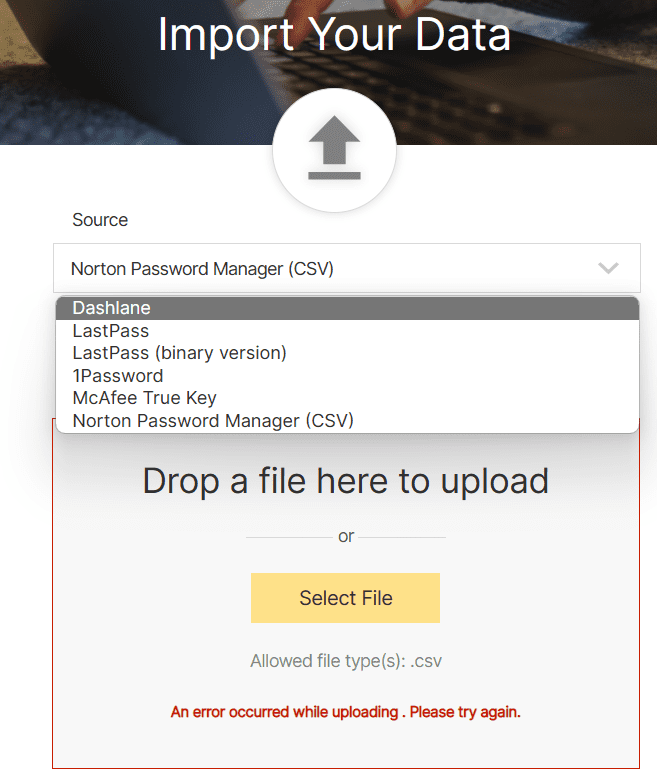
For me, this is a huge issue — every major browser supports password management and the ability to export a .CSV file. Even if you’re not using a dedicated password manager, you likely have already stored passwords through your browser.
Norton Password Manager not supporting imports from any major browser is a big drawback. You’ll basically have to start saving your passwords to Norton Password Manager from scratch.
Overall: (5)
Norton Password Manager’s interface was simple and intuitive. I never had a problem finding exactly what I was looking for.
If you’ve used a stand-alone password manager, Norton Password Manager’s UX will probably look familiar. The navigation panel with all of your major options is on the right-hand side, letting you access your login information, wallet, addresses, notes, safety dashboard, settings, and password generator.
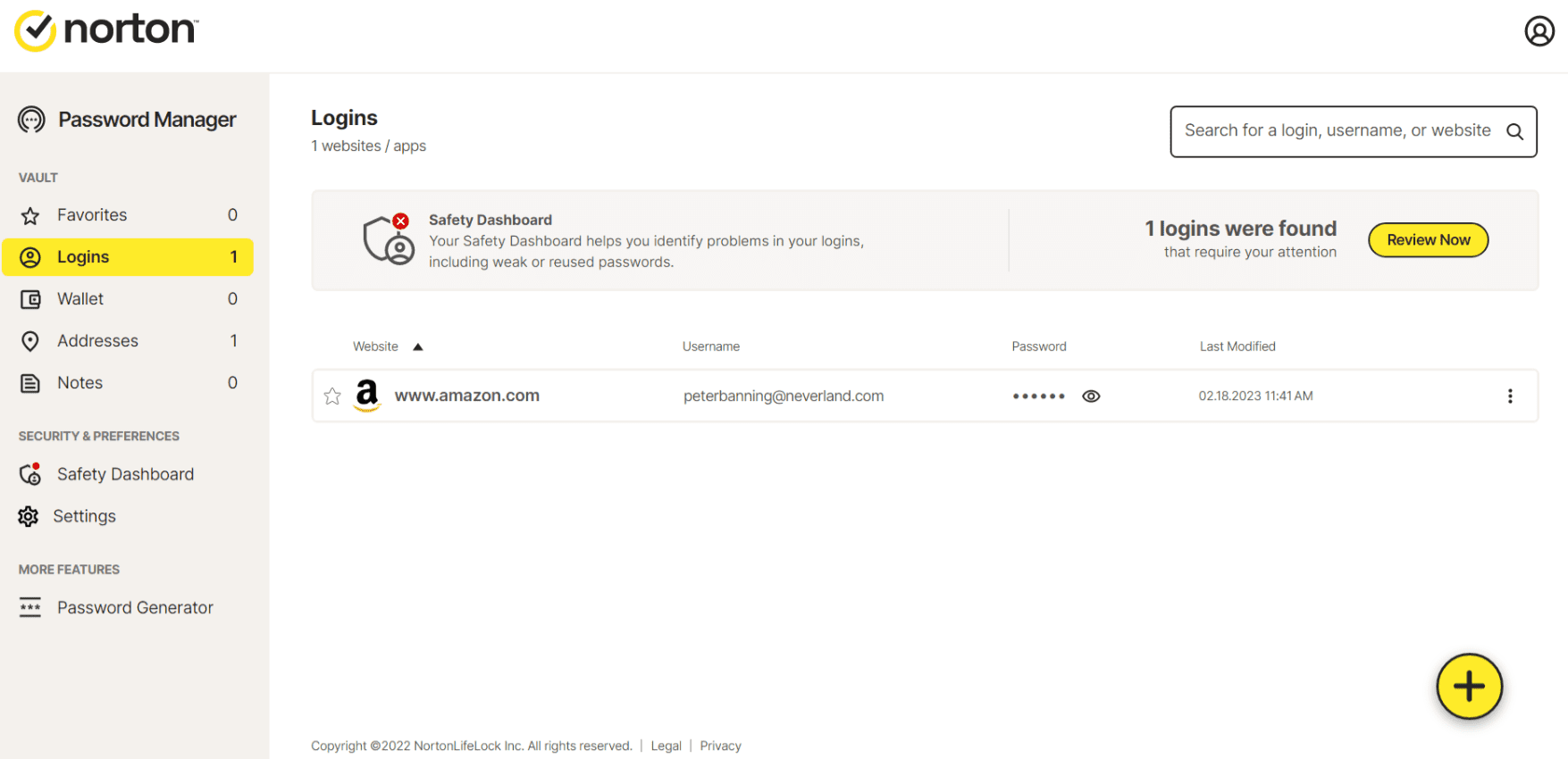
While I may not have been able to import my passwords, I set up the auto-save function, which recognized when I filled in a username and password on a website and automatically created a new login form in the vault. This information was also easy to find and edit as needed. If a problem is detected, it will also give you an obvious alert, as shown in the example above.
Overall: (3)
Form filling works fine for usernames and passwords, but not much else.
Norton Password Manager allows you to add addresses to your vault and other relevant info regarding each address — such as differing email addresses for work and home.
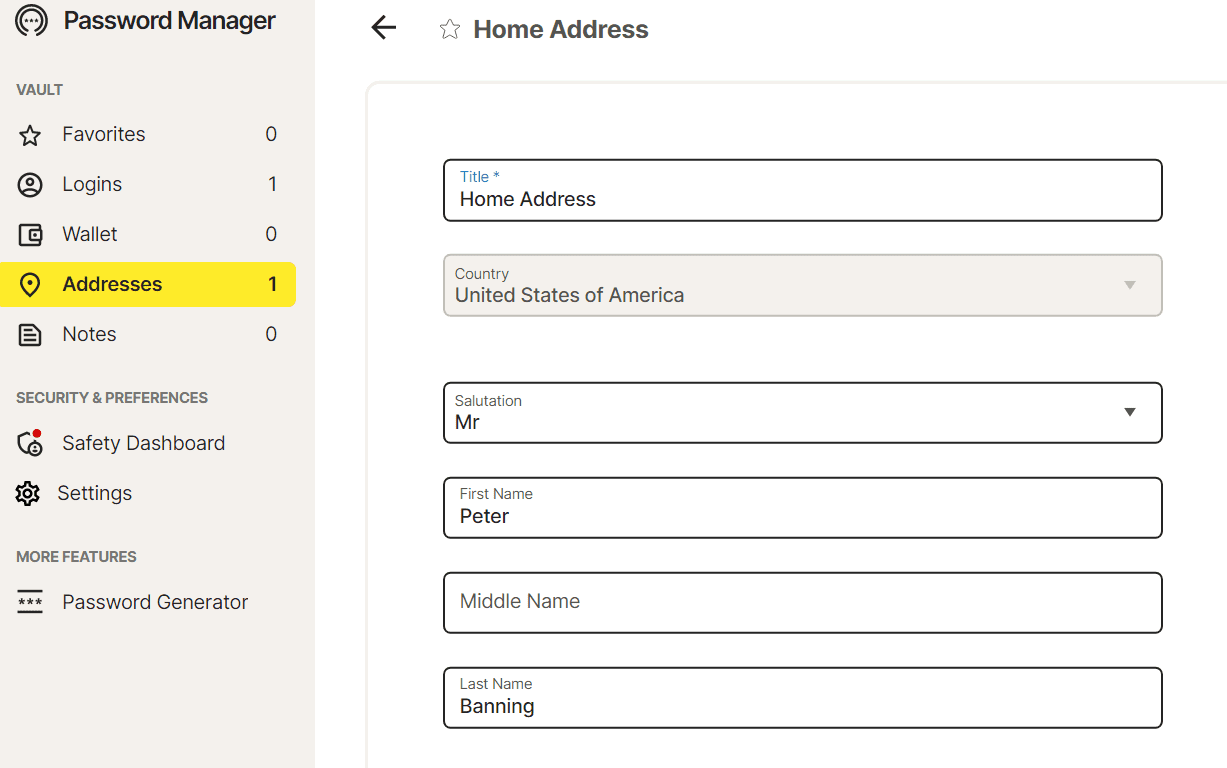
It didn’t take me long to run into issues though. While autofill worked fine for simple sign-ins requiring only an email and password, it couldn’t seem to recognize address forms, despite having added an address to my vault. It is worth noting that the stock Microsoft Edge form filler was happy to pick up the ball when Norton Password Manager dropped it.
When immediately going to Norton Password Manager’s support for help, I didn’t find a solution through the help center or community support and had to move to live chat support.
To Norton Password Manager’s credit, I didn’t have to wait long for help, which included the team remote accessing my computer. However, even they couldn’t get the address form filling to work, despite having access to my computer for almost an hour and installing another browser onto my workstation.
Overall: (3)
Some useful security features, but no transparent information regarding encryption standards or known security breaches raise red flags.
Most password managers love to brag about their encryption protocols, but Norton Password Manager is surprisingly opaque when it comes to just how your data is encrypted. No matter where you look, security is merely described as “encrypted” without telling you what encryption standard it is using, including in the FAQ section.

Add this to Norton Password Manager’s history of security breaches, with the last one occurring in December 2022, and it doesn’t paint a picture of an especially trustworthy warden of your information.
Overall: (3)
Desktop 2FA options are limited to an authenticator app available on Android and iOS.
2FA is limited to a mobile authenticator that can unlock your vault without needing to use your master password.

However, this option only unlocks your vault — you cannot set it up to ping you with a one-time password (OTP) for individual login attempts. Arguably, this makes your vault less secure as it depends on the security you use on your phone (such as fingerprint, faceID, and PIN).
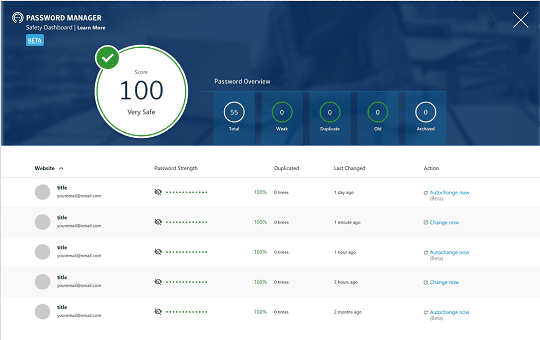
Norton Password Manager recently added a “Safety Dashboard” which analyzes and gives suggestions for the strength of passwords in your vault. As of writing, this feature is still in beta.
| Provider |  Score (3.8) Starting Price Free Free Trial No Encryption Undisclosed 2FA  Platform & Device Compatibility Android, iOS, Chrome, Edge, Firefox, Safari Password Generator Password Sharing  Password Recovery Data Breach Monitoring Email Masking | Best Overall Password Manager  Score (4.7) Starting Price Free Free Trial 30-day Encryption XChaCha20 encryption 2FA Platform & Device Compatibility Windows, macOS, Linux, Android, iOS, and popular browsers, such as Google Chrome, Firefox, Edge, Brave, Opera, and Safari Password Generator Password Sharing Password Recovery Data Breach Monitoring Email Masking |  Score (4.8) Starting Price Free Free Trial No Encryption AES 256-bit encryption with PBKDF2 SHA256 2FA Platform & Device Compatibility Windows, Mac, iOS, and Android with support for all their respective major browsers, including Microsoft Edge Password Generator Password Sharing Password Recovery Data Breach Monitoring Email Masking |  Score (4.6) Starting Price $2.99 per month Free Trial 14-day Encryption AES 256-bit encryption 2FA Platform & Device Compatibility Android, iOS, Linux, Mac, Web (Brave, Chrome, Edge, Firefox, Safari), Windows Password Generator Password Sharing Password Recovery Data Breach Monitoring Email Masking |  Score (4.7) Starting Price Free Free Trial 30-day Encryption AES 256-bit encryption 2FA Platform & Device Compatibility Android, iOS, Mac, Web (Chrome, Edge, Firefox, Safari), Windows Password Generator Password Sharing Password Recovery Data Breach Monitoring Email Masking |  Score (4.7) Starting Price $3.75 per user Free Trial 30-day Encryption AES 256-bit encryption 2FA Platform & Device Compatibility Windows, MacOS, Linux, Android, iPhone, and iPad. Browser extensions for Safari, Opera, Internet Explorer, Firefox, Edge, Chrome Password Generator Password Sharing Password Recovery Data Breach Monitoring Email Masking |
|---|---|---|---|---|---|---|
| Score | (3.8) | (4.7) | (4.8) | (4.6) | (4.7) | (4.7) |
| Starting Price | Free | Free | Free | $2.99 per month | Free | $3.75 per user |
| Free Trial | No | 30-day | No | 14-day | 30-day | 30-day |
| Encryption | Undisclosed | XChaCha20 encryption | AES 256-bit encryption with PBKDF2 SHA256 | AES 256-bit encryption | AES 256-bit encryption | AES 256-bit encryption |
| 2FA | | | | | | |
| Platform & Device Compatibility | Android, iOS, Chrome, Edge, Firefox, Safari | Windows, macOS, Linux, Android, iOS, and popular browsers, such as Google Chrome, Firefox, Edge, Brave, Opera, and Safari | Windows, Mac, iOS, and Android with support for all their respective major browsers, including Microsoft Edge | Android, iOS, Linux, Mac, Web (Brave, Chrome, Edge, Firefox, Safari), Windows | Android, iOS, Mac, Web (Chrome, Edge, Firefox, Safari), Windows | Windows, MacOS, Linux, Android, iPhone, and iPad. Browser extensions for Safari, Opera, Internet Explorer, Firefox, Edge, Chrome |
| Password Generator | | | | | | |
| Password Sharing | | | | | | |
| Password Recovery | | | | | | |
| Data Breach Monitoring | | | | | | |
| Email Masking | | | | | | |
| Learn More | Learn More Norton Editorial Review | Learn More NordPass Editorial Review | Learn More Roboform Editorial Review | Learn More 1Password Editorial Review | Learn More Dashlane Editorial Review | Learn More Keeper Editorial Review |
Norton Password Manager doesn’t offer much more than simple password management without any additional features of other free password managers. The company is also more cagey about what security protocols it uses, which every other provider gives as open information.
Norton Password Manager has had many high-profile security breaches lately, which may give you pause in trusting the company with your information. But it’s worth noting that due to how password managers function, it’s unlikely any information stored in Norton Password Manager would be vulnerable, even if it were leaked.
No, the password manager is the same product regardless of your Norton subscription level.
Passwords are encrypted and stored in Norton Password Manager’s servers. This data is only unencrypted locally on your device via your master password.
Norton entered the computer security scene as Norton Antivirus, an anti-malware software product founded by Peter Norton, developed and distributed by Gen Digital in 1990. Gen Digital Inc. (formerly Symantec Corporation and NortonLifeLock) is a multinational software company co-headquartered in Tempe, Arizona, and Prague, Czech Republic. Its portfolio includes Norton, Avast, LifeLock, Avira, AVG, ReputationDefender, and CCleaner.
Our rating process involves a thorough and detailed study of the various features stacked against the competition. I looked at the multiple facets and features provided by 1Password compared to other significant industry players through direct testing to ensure an accurate rating. I’ve also applied my experience using 1Password to provide a user’s perspective.
I signed up for a plan with Norton Password Manager to test:
Learn more about our review methodology.

Bottom line: Norton Password Manager is free and mostly easy to use and may win over many users thanks to the company’s longevity in the internet security space. While it does its primary function well enough to recommend it, outside of simply remembering your login information and passwords, it doesn’t do much else to stand out.

About The Password Manager, Gunnar Kallstrom:
Gunnar Kallstrom is a Cyber Team Lead for a DOD contracting company in Huntsville, AL, and has also worked as a CND Cyber Analyst. An author and content creator for a cybersecurity academy, Gunnar spent nearly 15 years in the Army as a musician before entering the cybersecurity field.
He holds a bachelor’s degree in music from Thomas Edison State University and a master’s in organizational development and leadership from the University of the Incarnate Word.
Kallstrom has completed several CompTIA courses, including Secruity+, Network+, A+ Core 1, and A+ Core 2. He earned a CompTIA Security+ Certification. Additionally, he has completed the Cyber Warrior Academy program with more than 800 hours of hands-on, intensive, and lab-driven technical training in cybersecurity methods and procedures.
Passionate about all things cyber, Kallstrom was a speaker on a panel at the 2022 InfoSec World conference, giving a talk entitled “Hacking into a Cyber Career – True Stories.” Kallstrom is also a mentor to entry-level cybersecurity candidates seeking to break into the field. When he’s not working, he still enjoys playing guitar and fishing (not phishing).