Zoho Vault provides excellent and affordable password manager options and unlimited storage for individuals and businesses.
By:Gunnar Kallstrom , Updated October 28, 2025 Head of information systems and cybersecurity research
Updated October 28, 2025
Zoho Vault: A Quick Overview
Bottom line: Zoho Vault has made continual improvements over the years to grow into a solid and secure password manager solution. It’s best for small businesses since it’s free (or low cost) to use, but even enterprise-level customers will pay less than they may with other services – and you don’t need to provide credit card information for a free trial.
While it may lack a bell here or whistle there (like web form filling), it does the basics well, allows you to set your preferred multifactor authentications (MFA), and has advanced password-sharing tools.
Who should choose Zoho Vault? Small to midsize businesses (SMBs) will get an excellent, affordable, and secure product. Personal users love its price, but some features and functionality may be intimidating for non-techie types. Larger organizations looking for a slew of features might find other services more appealing.
Zoho Vault’s Editor Rating
Overall: 4.4
After testing Zoho Vault’s features, I've given it 4.4/5 stars. This rating is based mainly on its affordability, ability to choose your two-factor authentication (2FA) method, tight security features, unlimited storage, and browser extensions.
There are many options when exploring the best password manager for personal or business needs, and Zoho Vault is a top contender.
Read on to learn about the pros, cons, features, and pricing of Zoho Vault. And get answers to frequently asked questions.
What Are the Pros and Cons of Zoho Vault?
Zoho Vault goes all in on security and affordability, as well as compatibility and integration with most browsers and applications. While it might be too over the top for an individual and missing a few features for the largest organizations, it can be a “just right” solution for SMBs.
Here are some pros and cons to consider:
Pros
Security: There haven’t been any breaches of Zoho Vault, thanks to its proven security strategy, which includes advanced 256-bit encryption and zero-knowledge architecture.
Plan variety: Zoho Vault’s four plan levels are perfectly synced up to different personal and business needs.
Free 15-day trial for all plans: Test out Zoho Vault for your needs with no credit card, which is a welcome change and builds trust. If you sign up for a paid plan, you can cancel, upgrade, or downgrade at any time.
Emergency password access for teams: This feature lets you assign an emergency contact with full access to all passwords if needed during a crisis.
Cons
Safari users can’t import: Switching over to Zoho Vault can be a seamless process, but if you’re trying to import your saved Safari passwords, you won’t have the option to do that.
No 24- hour support on weekends, and there’s no live chat: While weekday-only 24-hour support might suffice for businesses that keep regular Monday through Friday hours, it’s less support than some other password manager providers offer.
Who Should Choose Zoho Vault?
Step1.Individuals: If you’re concerned about password hygiene, the free version will keep your digital house in order.
Step2.Small to medium-sized businesses: Zoho Vault’s affordable paid plan options provide extra features like sharing passwords, advanced user controls, reporting, and audits.
Zoho Vault Plans and Pricing
Overall: (5)
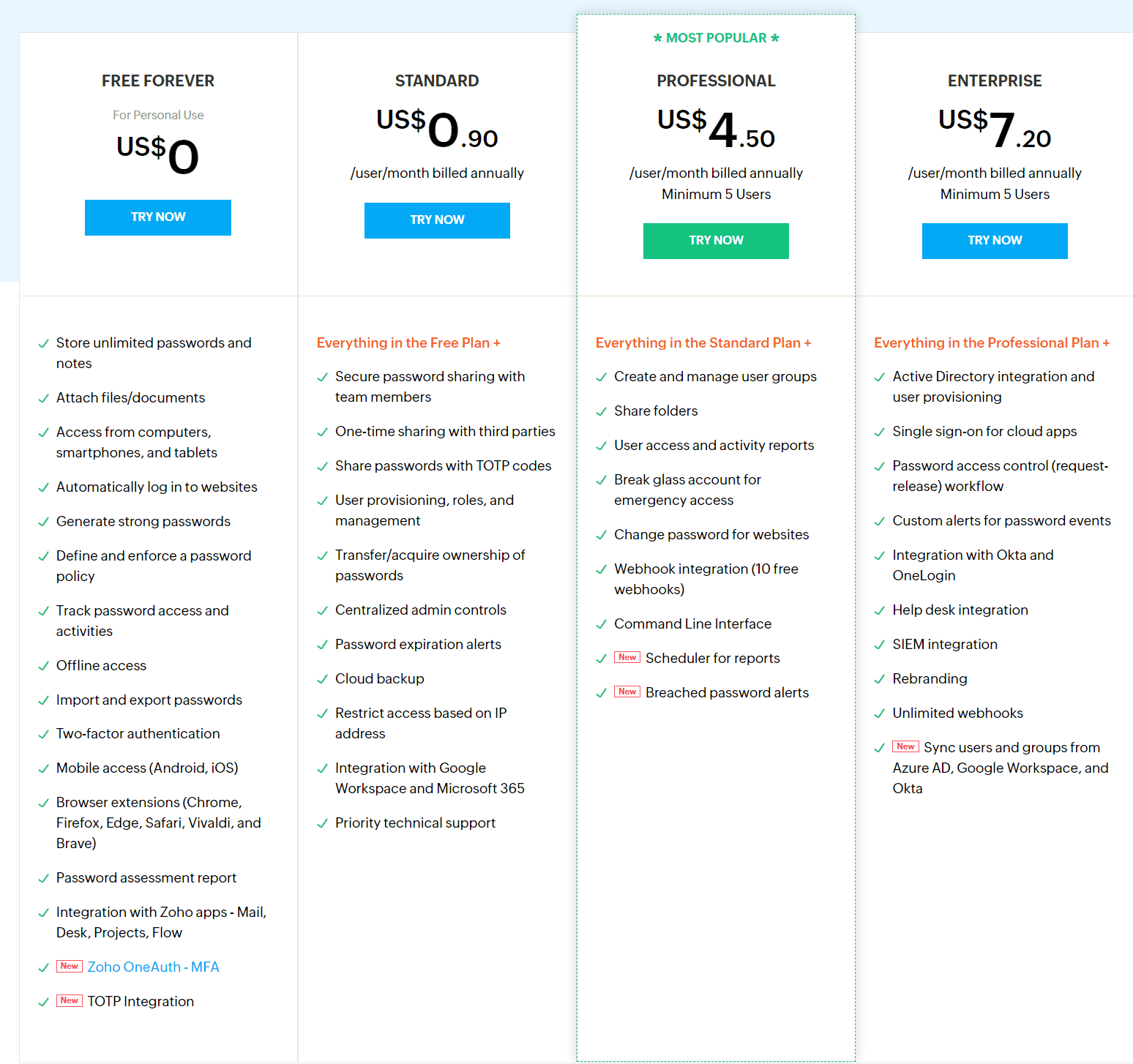
Zoho Vault offers Free Forever, Standard, Professional, and Enterprise plans. The personal plan is free, Standard is .90 cents per user per month, Professional is $4.50 per user per month, and Enterprise is $7.20 per user per month (billed annually).
Free Forever
Standard
Professional
Enterprise
Price
Free
$.90 per user per month
$4.50 per user per month
$7.20 per user per month
Best for
Individuals
Families, small teams
SMBs
Large businesses
Free trial
15-day
15-day
15-day
15-day
Platform compatibility
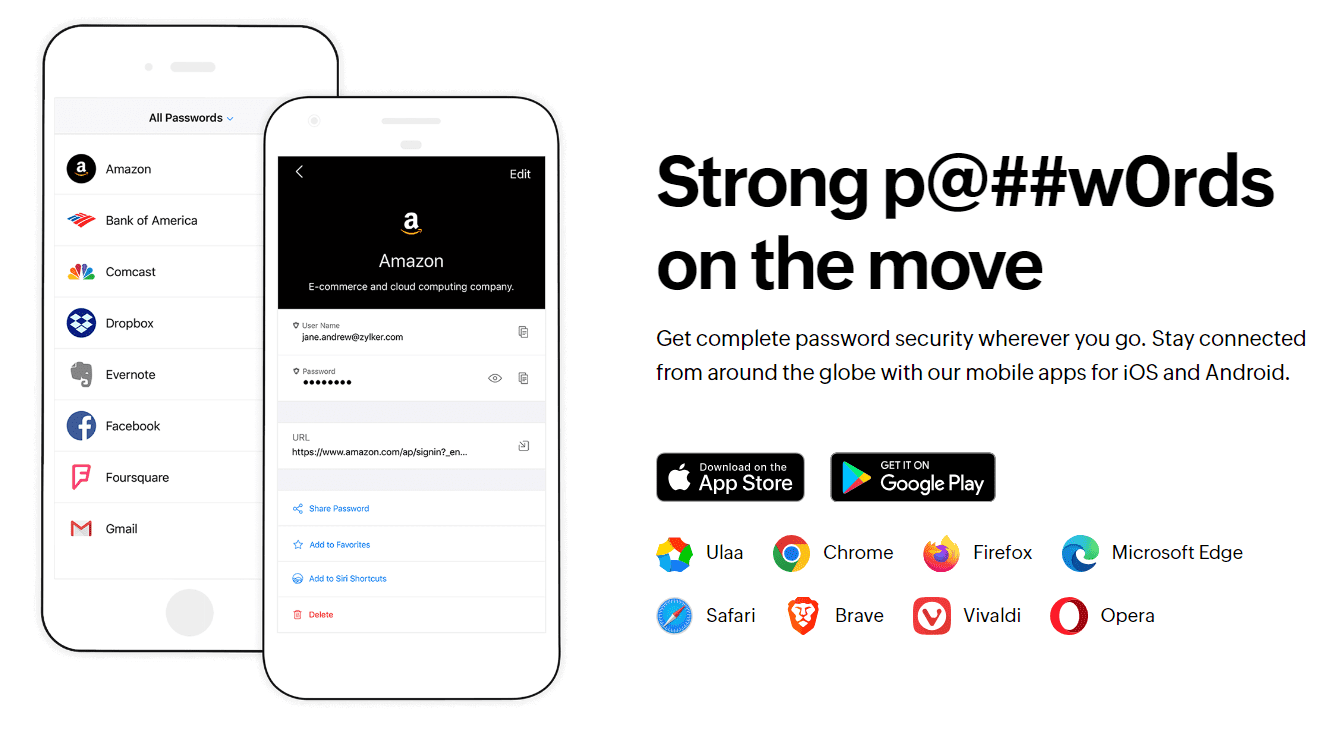
Android, iOS, Linux, Mac, Web (Brave, Chrome, Edge, Firefox, Safari, Vivaldi), Windows
Android, iOS, Linux, Mac, Web (Brave, Chrome, Edge, Firefox, Safari, Vivaldi), Windows
Android, iOS, Linux, Mac, Web (Brave, Chrome, Edge, Firefox, Safari, Vivaldi), Windows
Android, iOS, Linux, Mac, Web (Brave, Chrome, Edge, Firefox, Safari, Vivaldi), Windows
Autofill capability
Yes
Yes
Yes
Yes
Number of passwords
Unlimited
Unlimited
Unlimited
Unlimited
Available storage
Unlimited
Unlimited
Unlimited
Unlimited
Password sharing
No
Yes
Yes
Yes
2FA
Yes
Yes
Yes
Yes
Account recovery
Yes
Yes
Yes
Yes
Support types
24 hours a day/weekdays phone support; email
24 hours a day/weekdays phone support; email
24 hours a day/weekdays phone support; email
24 hours a day/weekdays phone support; email
Encryption
Advanced Encryption Standard (AES) 256-bit
AES 256-bit
AES 256-bit
AES 256-bit
Reporting capabilities
Yes (password assessment)
Yes (password assessment, logging all access to passports)
Yes (password assessment, logging all access to passports, intuitive password access)
Yes (password assessment, logging all access to passports, intuitive password access)
Zoho Vault is constantly adding updates, new features, and enhancements to its platform to stay competitive. I was able to use Zoho Vault on an Android phone and a Chrome web browser.
Zoho Vault UX
Overall: (4.7)
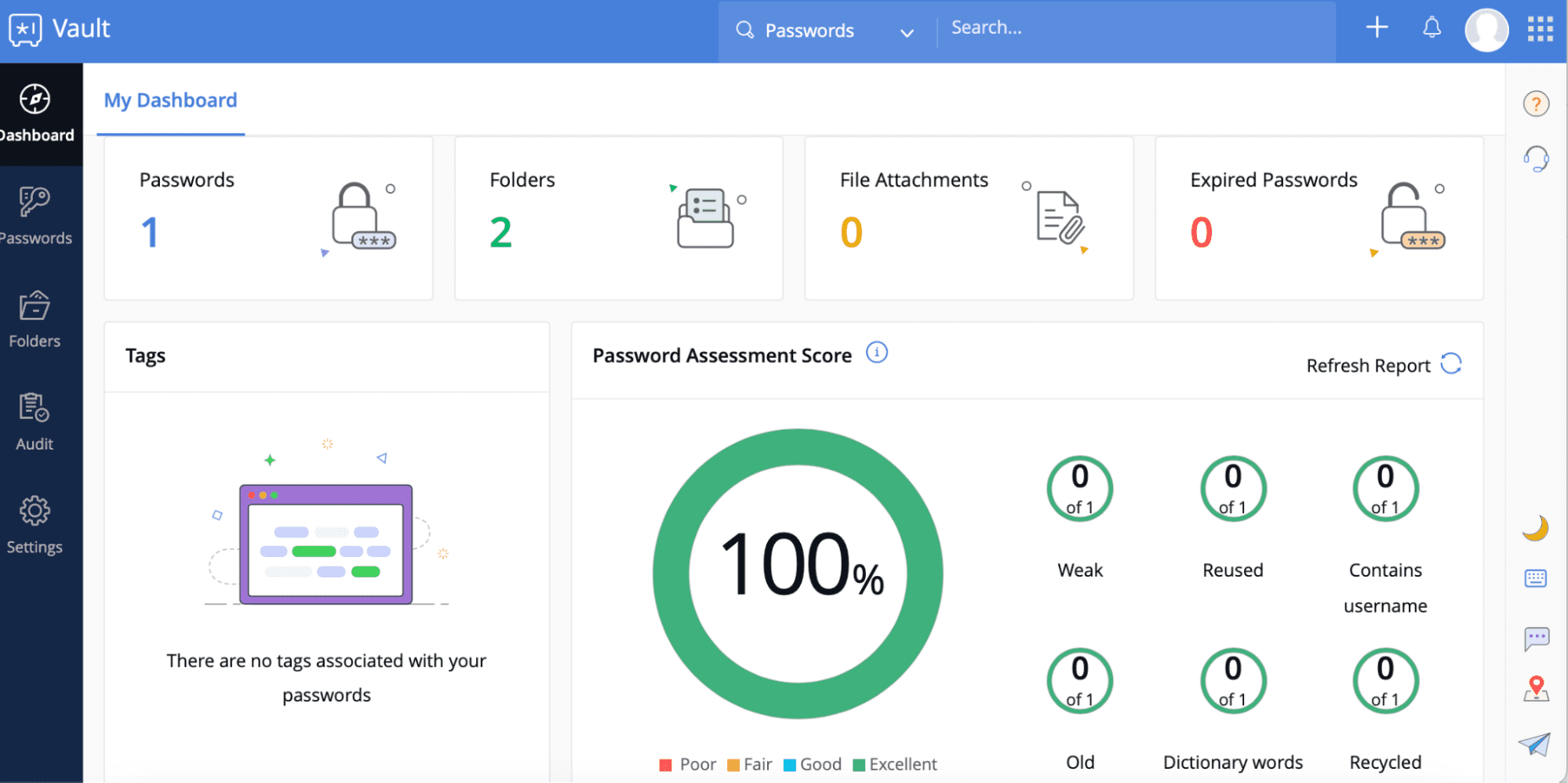
Zoho Vault’s desktop version has a user-friendly dashboard that gives you a snapshot of your overall password usage, a password assessment score, a breakdown of categories, and other insights.
The Zoho Vault free password manager plan has five main sections in the left toolbar to help you manage your account: Dashboard, Passwords, Folders, Audit, and Settings.
I found it easy to add a Zoho Vault extension to my Chrome browser. A browser extension makes it simple to quickly access your passwords or add/edit your list as you browse.
Zoho Vault Form Filling
Overall: (3)
One of Zoho Vault’s faults is its lack of form filling. The company is working on adding it as a feature.
Zoho Vault Security
Overall: (4.5)
Years of password management without any reported breaches is a true feat and a testament to Zoho Vault’s dedication to having a secure platform. It uses host-proof-hosting to ensure your data is encrypted and never accessible by anyone with access to the Vault server.
Zoho Vault is also adamant about its internal security policy, which includes dedicated security and privacy teams and physical security at data sites. It follows a 256-bit AES.
Zoho Vault Two-Factor Authentication
Overall: (4.5)
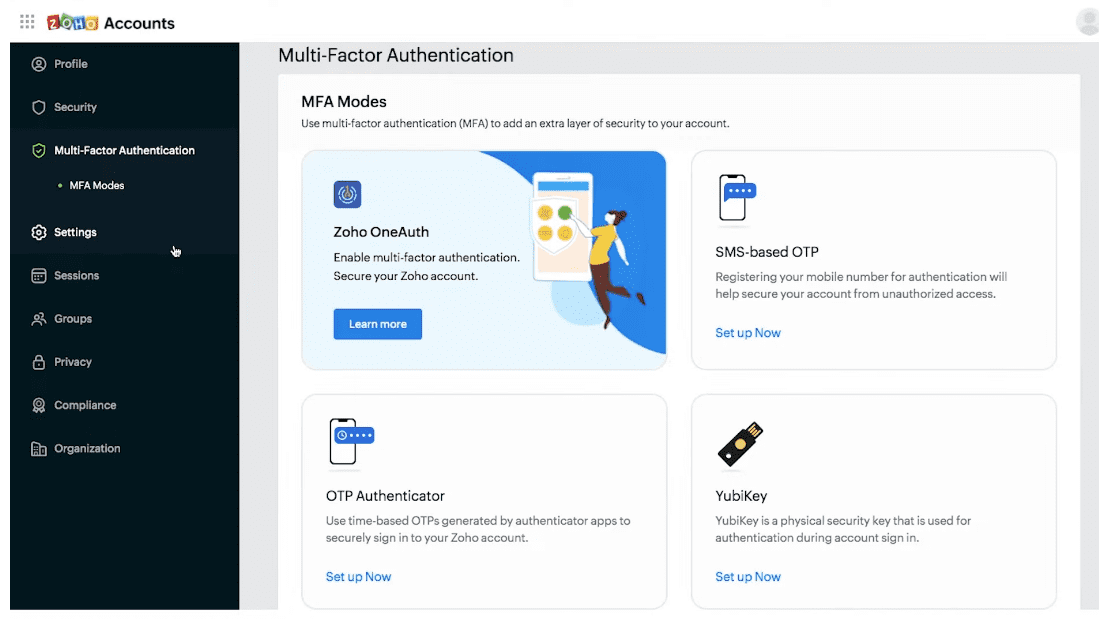
Zoho Vault uses MFA, and lets you decide which method you prefer. You can choose from SMS, voice call, or Google Authenticator. In addition, you can also try out Zoho OneAuth, the company’s MFA application for iOS and Android.
With OneAuth, you can set up your account using a variety of authentication factors, including Touch ID, Push notification, QR code, or Time-based OTP.
Recent Improvements to Zoho Vault
Here are some recent improvements to Zoho Vault:
Step1.Browser extension now includes passphrase‑generator for strong phrases.
Step2.Added TOTP integration so you can store one‑time codes alongside passwords.
Step3.Improved share‑folder ownership transfers for departing users.
Step4.Enhanced filtering by tags (e.g., “bank”) for faster vault access.
Compare Zoho Vault Alternatives
Zoho Vault is a strong competitor for password management compared to other solutions like 1Password and Dashlane. It all depends on the features you need and your budget. Looking closely at each password manager, our team developed an objective comparison chart to show you how Zoho Vault stacks up:
Platform & Device Compatibility Windows, macOS, Linux, Android, iOS, and popular browsers, such as Google Chrome, Firefox, Edge, Brave, Opera, and Safari
If you use Safari, Zoho Vault does not allow you to easily import your saved passwords to the platform, which can be a deterrent to making the switch. There is also no form autofill feature available, and support is only available 24 hours a day on weekdays with no live chat.
Can Zoho Vault be trusted?
Zoho Vault takes security and data privacy seriously and has not had any reported data breaches or other issues in its history. It is trustworthy with many levels of encryption, advanced security measures of both physical and cloud storage, MFA, and transparent pricing.
Is it worth paying for Zoho Vault?
For teams, paying for Zoho Vault’s higher-level plans may be well worth the additional features like password sharing, advanced reporting, and more.
Is Zoho Vault better than LastPass?
Determining if Zoho Vault is better than LastPass (or other competitors) depends on your needs and preferences. That said, Zoho Vault has the edge of offering free sync across all devices (which LastPass does not). Also, it has unlimited storage and fine-grained restrictions, unlike LastPass.
Where does Zoho Vault store my passwords?
Your passwords are stored in Zoho Vaults servers as encrypted data. In other words, even your master password is not accessible to Zoho, so you never have to worry about your information being compromised.
What Is Zoho Vault the Company?
Zoho Vault was developed in 2013 by its parent company, Zoho, a software company offering over 55 applications to more than 80 million users worldwide. The idea was founded in 1996 in Chennai, India by Sridhar Vembu, but the domain name Zoho.com came later when it was purchased in 2002. It became Zoho Corp in 2009.
How I Rated Zoho Vault
Our rating process involves a thorough and detailed study of the various features offered vis-a-vis the competition. I looked at the multiple facets and features provided by Zoho Vault compared to other significant industry players by direct testing to ensure an accurate rating.
While I did a comprehensive overview, more weight was given to factors important to end users, including ease of use, security, customer support, security breach reports, scalability, and price.
Zoho Vault did well in most categories, especially its security features and plan options, including a fairly solid free product version. With its free trial offer, it’s worth checking out, especially for small teams looking for a way to manage their passwords efficiently.
Bottom line:Google’s password manager remains a convenient, free tool for Chrome users in 2025. While it still lacks transparency around encryption and broader compatibility, recent design improvements and deeper integration with Android make it a viable option for casual users who stay within the Google ecosystem.
Gunnar Kallstrom, The Password Manager, is a Cyber Team Lead for a DOD contracting company in Huntsville, AL, and has also worked as a CND Cyber Analyst. An author and content creator for a cybersecurity academy, Gunnar spent nearly 15 years in the Army as a musician before entering the cybersecurity field.
He holds a bachelor’s degree in music from Thomas Edison State University and a master’s in organizational development and leadership from the University of the Incarnate Word.
Kallstrom has completed several CompTIA courses, including Secruity+, Network+, A+ Core 1, and A+ Core 2. He earned a CompTIA Security+ Certification. Additionally, he has completed the Cyber Warrior Academy program with more than 800 hours of hands-on, intensive, and lab-driven technical training in cybersecurity methods and procedures.
Passionate about all things cyber, Kallstrom was a speaker on a panel at the 2022 InfoSec World conference, giving a talk entitled “Hacking into a Cyber Career – True Stories.” Kallstrom is also a mentor to entry-level cybersecurity candidates seeking to break into the field. When he’s not working, he still enjoys playing guitar and fishing (not phishing).
Related Posts
Password Boss Review 2026: Expert Rated 4.6/5
We put Password Boss password manager to the test for plan value, compatibility, features, and security. See why The Password Manager rated Password Boss 4.6/5. Read More
We put Password Safe password manager to the test for plan value, compatibility, features, and security. See why The Password Manager rated Password Safe 3.6/5. Read More
Dashlane is a feature-rich, user-friendly password manager that stands out as one of, if not the, best on the market. Read More
Duo Review 2026: Expert Rated 4.8/5
We put Duo to the test for plan value, compatibility, features, and security. See why The Password Manager rated Duo 4.8/5. Read More
PassCamp Review 2026: Expert Rated 3.6/5
We put PassCamp password manager to the test for plan value, compatibility, features, and security. See why The Password Manager rated PassCamp 3.6/5. Read More