We put Intuitive Password to the test for plan value, compatibility, features, and security. See why Intuitive Password rated Intuitive 4.25/5.
By:Gunnar Kallstrom , Updated November 11, 2025 Head of information systems and cybersecurity research
Updated November 11, 2025
Intuitive Password: A Quick Overview
Bottom line: While I had my doubts about Intuitive Password after loading it for the first time, I eventually came to see its value as a low-priced option for those looking for premium security features. It may not win any beauty contests soon, but it does a job and (mostly) well.
Who should choose Intuitive? Personal users and businesses looking for great security features and easy password sharing.
Intuitive Password’s Editor Rating
Overall: 4.25
Intuitive Password’s excellent security features and competitive pricing plan is almost overshadowed by a UX design that is hard to parse at first glance and form filling that doesn’t quite hit the mark. Still, if you can get past the design, Intuitive Password is well worth a look.
Intuitive Password may not be much to look at, but those looking for a great range of password security options for a low monthly rate will find a lot to like with this Australia-based service.
Pros
Security: Intuitive Password offers a great suite of security tools at an excellent price, particularly once you start climbing the tier levels.
Plan variety: There are many plans to choose from with Intuitive Password — a total of nine across all levels, from individuals to enterprise-level businesses.
Free forever plan: It’s fairly limited, but the Basic plan is a great alternative to a limited trial.
Cons
Ironically unintuitive design: Intuitive Password’s UX design is among the worst I’ve ever seen. It’s functional but ugly.
Support is via email only: Unlike competitors that offer live 24/7 support, Intuitive Password only offers email support. That could be a problem when you need immediate help.
Who Should Choose Intuitive Password?
Step1.Families: Intuitive Password’s family plan is great for up to five family members with additional advanced security features available at the Family Pro level.
Step2.Mid to enterprise-level businesses: Intuitive Password’s business and enterprise plans offer flexibility attractive to large and small businesses.
Intuitive Plans and Pricing
Overall: (5)
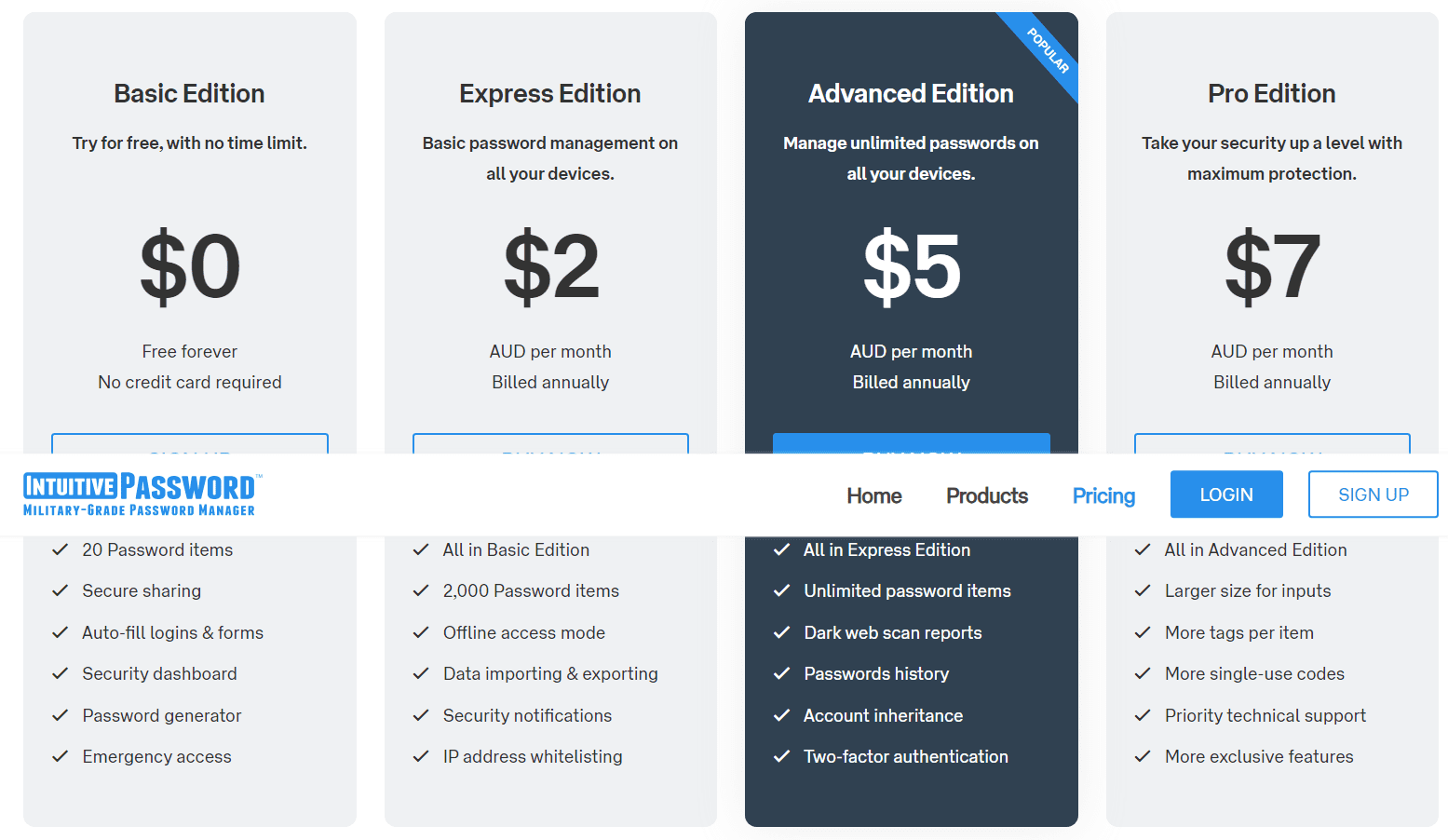
Intuitive Password offers much flexibility regarding plan options. While there is a completely free basic edition, arguably the best value plan is the advanced plan which starts to unlock some awesome security features like dark web scans and 2FA.
Remember that all prices are in AUD, the national currency of Australia. If you’re outside of Australia, your price may vary based on current exchange rates.
Basic Edition
Express Edition
Advanced Edition
Pro Edition
Family Plus
Business/Enterprise
Price
Free
$2 per month AUD
$5 per month AUD
$7 per month AUD
$15 per month AUD
Custom quote
Best for
New users
Individuals with multiple devices
Individuals who want full security options
Individuals who want more uses of advanced security features
Families
Businesses
Free trial
None
None
None
None
None
None
Platform compatibility
Android, iOS, Linux, Mac, Web (Opera, Chrome, Edge, Firefox, Safari), Windows
Android, iOS, Linux, Mac, Web (Opera, Chrome, Edge, Firefox, Safari), Windows
Android, iOS, Linux, Mac, Web (Opera, Chrome, Edge, Firefox, Safari), Windows
Android, iOS, Linux, Mac, Web (Opera, Chrome, Edge, Firefox, Safari), Windows
Android, iOS, Linux, Mac, Web (Opera, Chrome, Edge, Firefox, Safari), Windows
Android, iOS, Linux, Mac, Web (Opera, Chrome, Edge, Firefox, Safari), Windows
Autofill capability
Yes
Yes
Yes
Yes
Yes
Yes
Guest accounts
Yes
Yes
Yes
Yes
Yes
Yes
Number of passwords
20
2,000
Unlimited
Unlimited
Unlimited
Unlimited
Password sharing
Yes
Yes
Yes
Yes
Yes
Yes
2FA
No
No
Yes
Yes
Yes
Yes
Account recovery
Yes
Yes
Yes
Yes
Yes
Yes
Support types
24/7 email support
24/7 email support
24/7 email support
24/7 email support
24/7 email support
24/7 email support
Encryption
A combination of cipher suites and Transport Layer Security (TLS) protocols
A combination of cipher suites and TLS protocols
A combination of cipher suites and TLS protocols
A combination of cipher suites and TLS protocols
A combination of cipher suites and TLS protocols
A combination of cipher suites and TLS protocols
Reporting capabilities
No
No
Yes
Yes
Yes
Yes
Single sign-on (SSO)
No
No
No
No
No
No
Intuitive Password Platform Compatibility
Overall: (5)
The latest version, 16.0.0.0713 (released July 13, 2023) is compatible with:
I’m happy to report that Intuitive Password is compatible with all major platforms. As a browser-only application (with a browser-specific extension), it can be used where its supported browsers are — and since it supports every major browser on the market, that’s basically anywhere.
While it takes a little getting used to, running Password Manager through a browser tab wasn’t a big deal, as once you have everything set up the browser extension runs seamlessly in the background.
Intuitive Password UX
Overall: (3.5)
The UX is serviceable, but could definitely use a makeover.
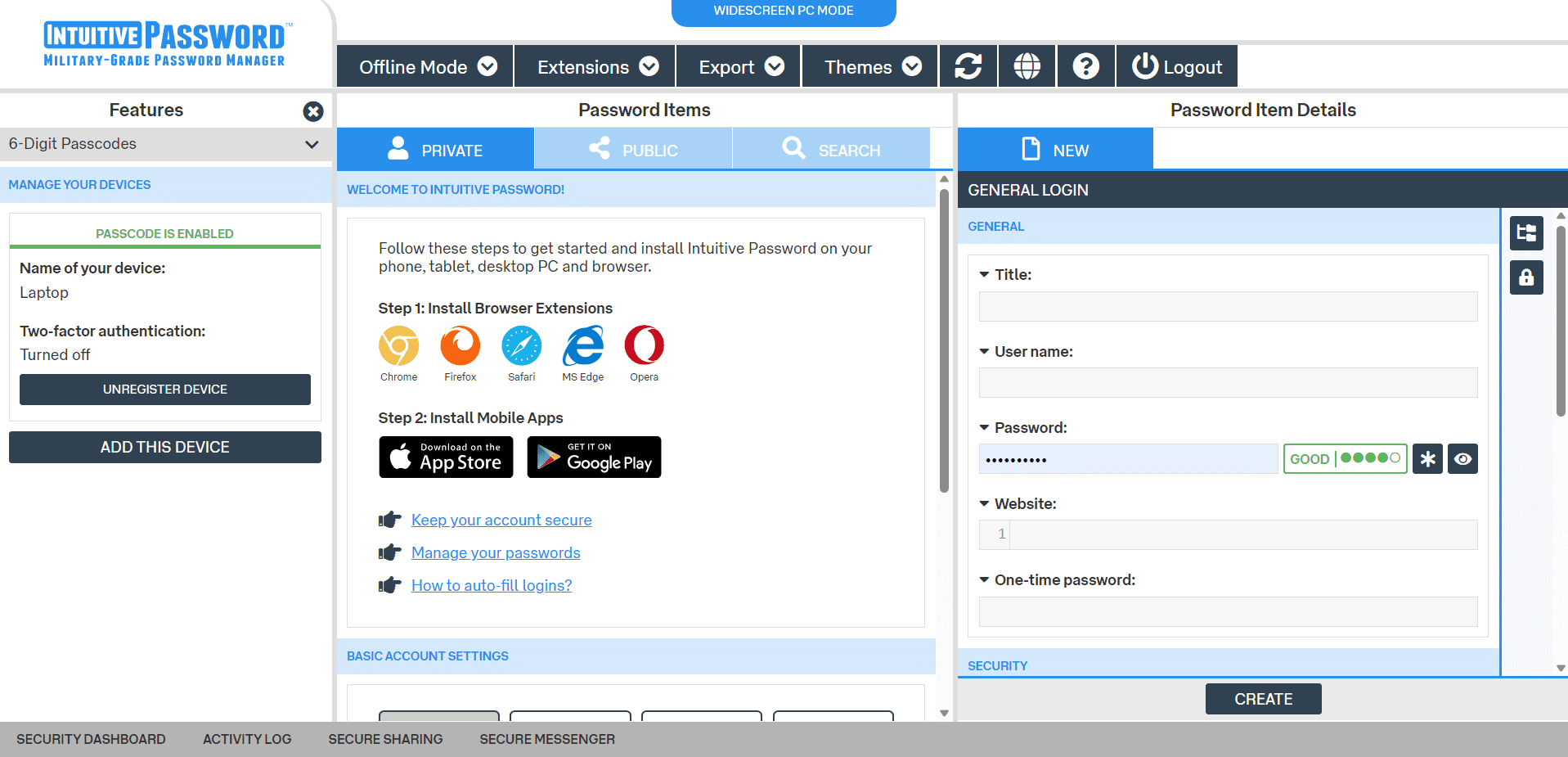
I have something to confess — in the course of reviewing many password managers, I’ve never come across one that I find quite as baffling and unappealing as Intuitive Password. It’s a deep irony that “Intuitive” is a part of the name of the product because upon opening it I felt a profound sense of confusion and overstimulation.
There is a lot going on with the UX and to my sensibilities, it feels like a mess of oddly-aligned buttons, weirdly-sized windows, and an overwhelming number of text sizes.
All that aside, it did its best to guide me through its use and I generally found the things I was looking for. Your mileage may vary, and it’s possible that it wasn’t designed to jive with my brain. At the end of the day, it works — I’d just describe it as far from intuitive.
Intuitive Password Form Filling
Overall: (3.5)
Passwords autofill just fine, but forms require additional steps and tend to miss fields.
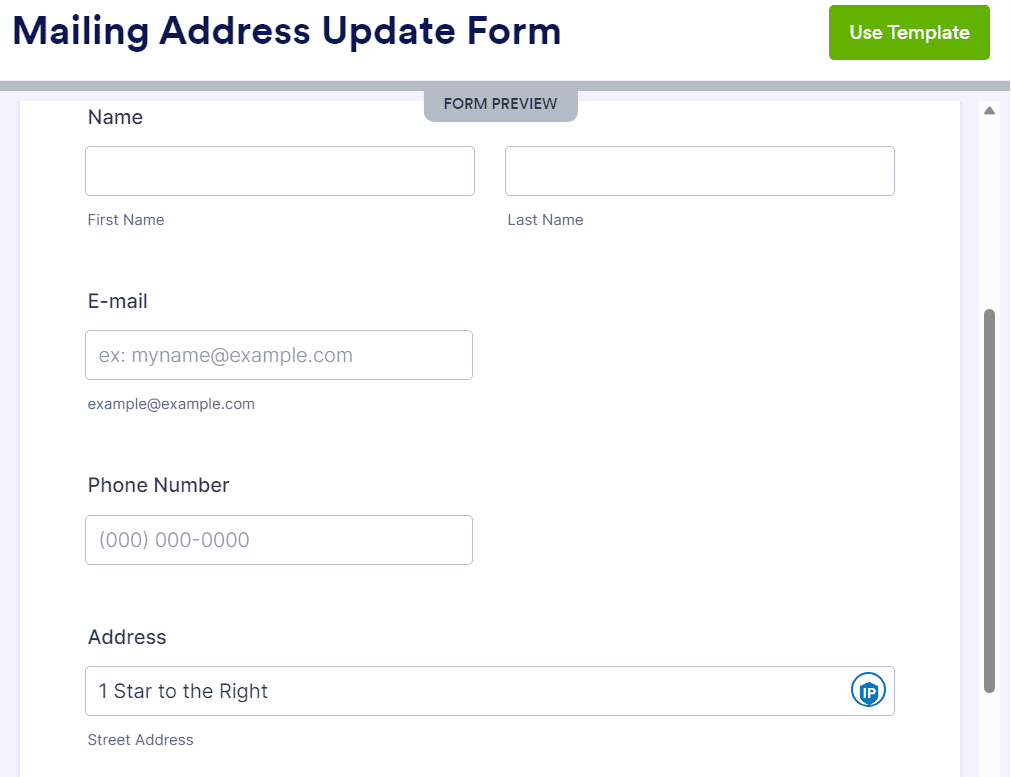
During my time with Intuitive Password, I never had a problem with an automatic login account names and passwords. I ran into a little more trouble in general form fields, such as shipping addresses.
I loved the ability to create a multitude of “identities” within Intuitive Password (basically, specialized data sets), yet its ability to use that information to fill in forms was spotty at best. It seemed to particularly struggle with the “Name” and “Phone Number” fields as shown in the example below.
While autofill should have worked better than it did, it’s worth pointing out that almost every browser has autofill functionality enabled by default, so this may not be a deal breaker. Still, it’s disappointing.
Intuitive Password Security
Overall: (5)
A solid set of security features is a clear standout feature for Intuitive Password, particularly at price points where advanced features start opening up.
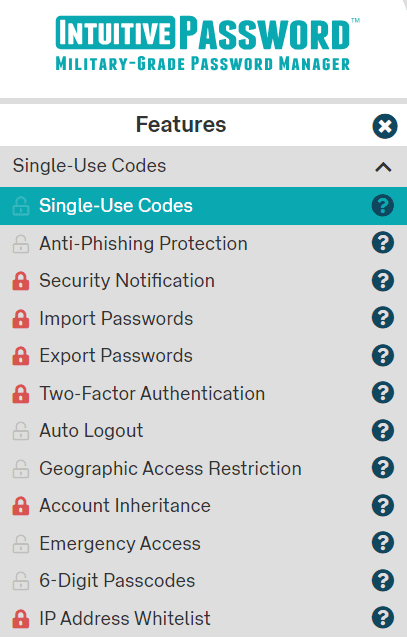
Most of Intuitive Password’s best features are locked in the free version and lowest paid tier. The good news is that it doesn’t take much to get your value’s worth out of the service — all features are unlocked starting at just $5 AUD ($3.37 USD at the conversion rate at the time of writing).
Things like Anti-Phishing protection are enabled even at the free tier, while great quality-of-life features like the ability to import passwords is reserved for the Advanced tier.
While it doesn’t advertise what specific encryption standards are being used, it describes them as “military grade” and that it uses a combination of cipher suites and TLS protocols. It also employs a zero-knowledge policy, denying the ability to encrypt the data stored through the application.
Intuitive Password Two-Factor Authentication
Overall: (3.5)
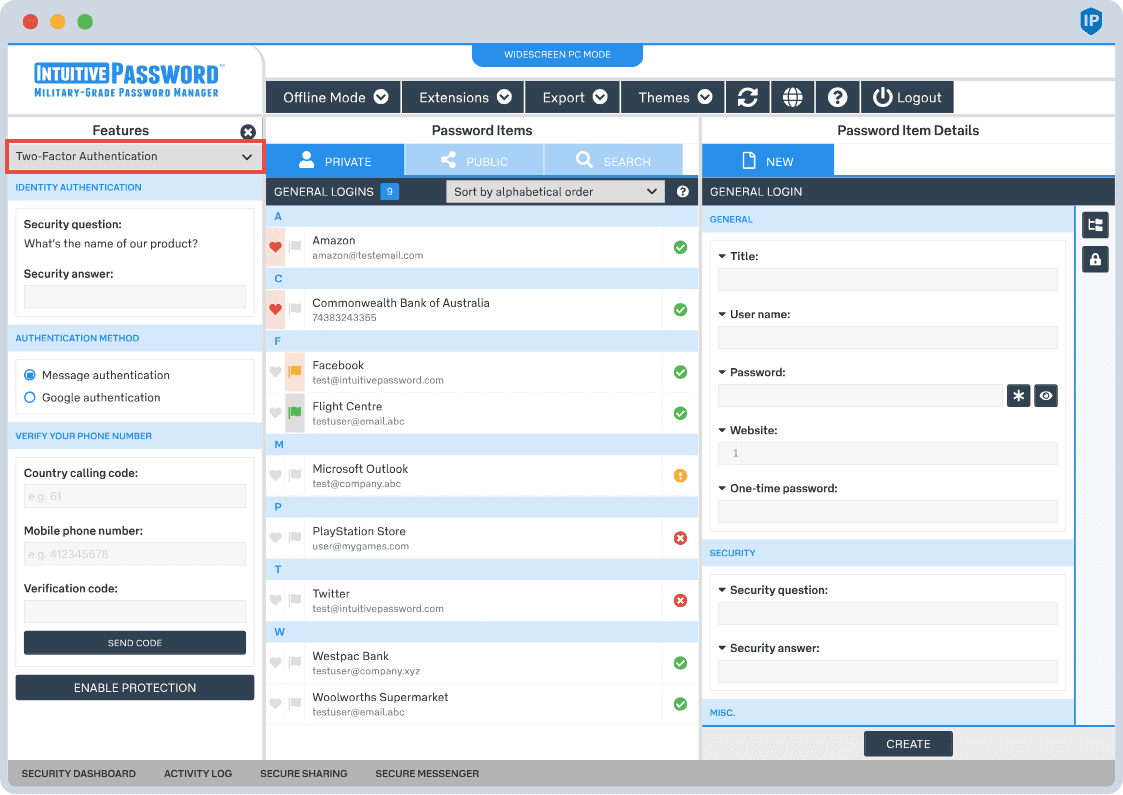
2FA is available, but options are limited to mobile authenticator apps.
2FA is available for Intuitive Password, but only at the Advanced tier.
It’s a welcome security feature, but I was disappointed by the lack of 2FA options, being limited to text verification or Google authenticator app. These are fine methods, but I would have liked to have had biometric options available and potentially using USB security keys.
It would have also been nice to use 2FA to secure individual accounts instead of the entire application. But if the available options are “Everything” or “Nothing,” the former is the better choice.
Recent Improvements to Intuitive Password
Here are recent improvements for Intuitive Password:
Step1.Added a Password Security Report (beta) feature.
Step2.Upgraded backend frameworks and improved performance of password imports.
Step3.Enhanced UI for enterprise sharing, and updated licensing structure for admin users.
Step4.Expanded platform support to include Android, iOS, Linux, macOS and major browsers.
Older 2023 updates include:
The addition of a Password Security Report (beta)
Enhancements to the Dark Web Scan Report
Improved the performance of the password importing process
Compare Intuitive Password Alternatives
Intuitive Password has strong competition in the password management field, with competitors including Dashlane, Keeper, RoboForm, LastPass, and NordPass which could be a better fit for your needs.
See how Intuitive Password compares to other top-tier password managers:
Platform & Device Compatibility Windows, macOS, Linux, Android, iOS, and popular browsers, such as Google Chrome, Firefox, Edge, Brave, Opera, and Safari
While this is a subjective opinion, I found the biggest barrier to using Intuitive Password was its UX. I was immediately overwhelmed and confused when starting, and I’m no stranger to odd UX decisions in a password manager.
Can Intuitive Password be trusted with my information?
According to Intuitive Password’s website, all passwords and personal information stored in Intuitive Password are exclusively accessible through your Master Password. It never stores or transmits your Master Password and ensures the encryption of all your data.
Is it worth paying for Intuitive Password?
The Basic plan is free but only lets you store up to 20 passwords and doesn’t support 2FA or password importing from spreadsheets or other apps. Plans are fairly inexpensive, though, starting at only $1.35 AUD.
How do I contact customer support for Intuitive Password?
You can contact Intuitive Password’s customer support via email and live chat.
Where does Intuitive Password store my passwords?
All data is stored on Intuitive Password’s servers, which some may consider a security risk.
What Is Intuitive Password the Company?
Intuitive Security Systems is a limited liability company (LLC) based in Australia and formed in 2013 by a group of experienced engineers. It provides military-grade password management services to safeguard passwords and confidential data.
How I Rated Intuitive Password
Our rating process involves a thorough and detailed study of the various features stacked against the competition. I looked at the multiple facets and features provided by Intuitive Password compared to other significant industry players through direct testing to ensure an accurate rating. I’ve also applied my experience using Intuitive Password to provide a user’s perspective.
I signed up for a plan with Intuitive Password to test:
Plan value: Most password managers offer various subscription plans from free to around $20 per month. While free plans may be sufficient for some, those that need more functionality may prefer paid plans.
Platform compatibility: You likely access your online accounts from multiple devices, including desktops, laptops, tablets, phones, as well as through different web browsers. Your password manager should be compatible with various devices, operating systems and browsers, and sync seamlessly between them all.
UX: This is how you interface with all the features and functions of your new password manager — if it’s bad, you’ll be less likely to use the service. While this is a highly subjective category and some will disagree, it’s important to provide an overview based on my experience.
Form filling: A password manager doesn’t have to include form-filling, but it’s somewhat standard and the ease with which it performs that function can be the deciding factor in which password manager you ultimately choose.
Security: Since a password manager is first and foremost a security tool, it should come with all of the most up-to-date standard security features. This includes the highest level of available encryption (256-bit AES with PBKDF2-HMAC-SHA512); 2FA, such as biometric logins or multi-factor authentication, and a password generator.
Two-factor authentication (2FA): Used all over the internet to protect your accounts, this is quickly becoming a standard security practice. 2FA is a great way to secure more sensitive accounts to ensure they’re not breached.
Bottom line: While I had my doubts about Intuitive Password after loading it for the first time, I eventually came to see its value as a low-priced option for those looking for premium security features. It may not win any beauty contests soon, but it does a job and (mostly) well.
Kallstrom is a Cyber Team Lead for a DOD contracting company in Huntsville, Alabama, and has also worked as a computer network defense (CND) Cyber Analyst. An author and content creator for a cybersecurity academy, Kallstrom spent nearly 15 years in the Army as a musician before entering the cybersecurity field.
He holds a bachelor’s degree in music from Thomas Edison State University and a master’s in organizational development and leadership from the University of the Incarnate Word.
Kallstrom has completed several Computing Technology Industry Association (CompTIA) courses, including Security+, Network+, A+ Core 1, and A+ Core 2. He earned a CompTIA Security+ Certification. Additionally, he has completed the Cyber Warrior Academy program with more than 800 hours of hands-on, intensive, and lab-driven technical training in cybersecurity methods and procedures.
Passionate about all things cyber, Kallstrom was a speaker on a panel at the 2022 InfoSec World conference, giving a talk entitled “Hacking into a Cyber Career – True Stories.” Kallstrom is also a mentor to entry-level cybersecurity candidates seeking to break into the field. When he’s not working, he still enjoys playing guitar and fishing (not phishing).