/ F-Secure ID Protection Review 2026: Expert Rated <...
F-Secure ID Protection Review 2026: Expert Rated 4/5
We put F-Secure ID Protection to the test for plan value, compatibility, features, and security. See why we rated F-Secure 4/5.
By:Gunnar Kallstrom , Updated October 30, 2025 Head of information systems and cybersecurity research
Updated October 30, 2025
F-Secure: A Quick Overview
Bottom line: F-Secure’s security features are top-notch and are a clear standout in the field. However, if you’re looking for a comprehensive form-filling solution or extensive two-factor authentication (2FA) options, you’d be better off looking elsewhere. If those things aren’t a major hit, F-Secure is well worth a look.
Who should choose F-Secure? Individuals and families will find a lot to like with F-Secure.
F-Secure’s Editor Rating
Overall: 4
F-Secure earns its rating with impressive security and ease of use but struggles when it comes to form filling and 2FA.
Customers love how easy it is to set up and use the ID Protection service offered by F-Secure, as well as the comprehensiveness of its security breach scans. Others have had issues with payments, but this seems to be limited to people overseas.
What Are the Pros and Cons of F-Secure?
F-Secure boasts an above-average security track record, streamlined setup, and consistent improvements, fixes, and upgrades. They compete with other providers for individual users but don’t seem to have a plan which caters to businesses. Here are its pros and cons:
Pros
Security: F-Secure offers a lot for its asking price — I was particularly impressed by its active email monitoring.
Simplicity: F-Secure is easy to set up and does a good job of helping manage your accounts and passwords.
Free five-day trial for all plans: While it’s not the longest trial period out there, a five-day trial without having to fork out credit card information until you’re ready to commit is a winning combination.
Frequent improvement: F-Secure has a great track record for keeping its services up to date, with improvements and updates every couple of months.
Cons
More expensive than its competition: While it’s not outrageously overpriced, F-Secure still clocks in at a more hefty $5 per month at the low end, while many competitors range from $2 to $3 for similar levels of service or even have free versions.
No general form filling: Automatic filling is limited to credit card info and login information — F-Secure does not support general form filling for things like addresses.
Who Should Choose F-Secure?
Step1.Individuals: The Standard plan is great for individuals, supporting up to five email accounts and five devices.
Step2.Families: If you need support for more people, F-Secure’s family plan covers you with up to 10 devices and email addresses.
F-Secure Plans and Pricing
Overall: (4)
F‑Secure’s password manager — offered under the ID Protection bundle — is priced from $49.99 per year for one device. For coverage of up to five devices, it’s $69.99 annually. The service includes unlimited password storage, dark‑web monitoring, and one year of full protection.
While there isn’t a free version available, F-Secure does offer a five-day free trial and doesn’t take your credit card info until you’re ready to purchase a plan, so trying the service out is easy and low-risk.
Personal plan (1 device)
Family plan (5 devices)
Price
$49.99 per year
$69.99 per year
Best for
New users
Families of 2+
Free trial
5-day
5-day
Platform compatibility
Android, iOS, Mac, Web (Chrome, Edge, Firefox, Safari), Windows
Android, iOS, Mac, Web (Chrome, Edge, Firefox, Safari), Windows
Autofill capability
Yes
Yes
Guest accounts
No
No
Number of passwords
Unlimited
Unlimited
Password sharing
No
No
2FA
Yes
Yes
Account recovery
Yes
Yes
Support types
Community Forum, online user guide, chat and phone support
Community Forum, online user guide, chat and phone support
Encryption
AES 256-bit encryption with Password-Based Key Derivation Function 2 (PBKDF2) standard
AES 256-bit encryption with PBKDF2 standard
Reporting capabilities
Yes
Yes
Single sign-on (SSO)
No
No
F-Secure Platform Compatibility
Overall: (4)
The latest version of F-Secure is compatible with:
Step1.Android (8.0 and later)
Step2.iOS (14.0 and later)
Step3.macOS (11 and later)
Step4.Windows 10 and 11 (64-bit)
Step5.Browsers (Chrome, Edge, Firefox, Safari)
F-Secure is compatible with the most common operating system (OS) distributions and browsers. But there’s one notable exception where it loses some points — Linux, a lesser-used OS platform when compared to Windows and Mac. It still has a fairly large install base with passionate and dedicated users and many of the most common computing platforms even use Linux as a base to build upon (such as Android devices).
It’s disappointing that Linux isn’t officially supported, yet those on Linux are nothing if not good at getting non-native programs to run on the platform.
F-Secure UX
Overall: (4.7)
F-Secure’s desktop version and browser extension work together for a seamless experience.
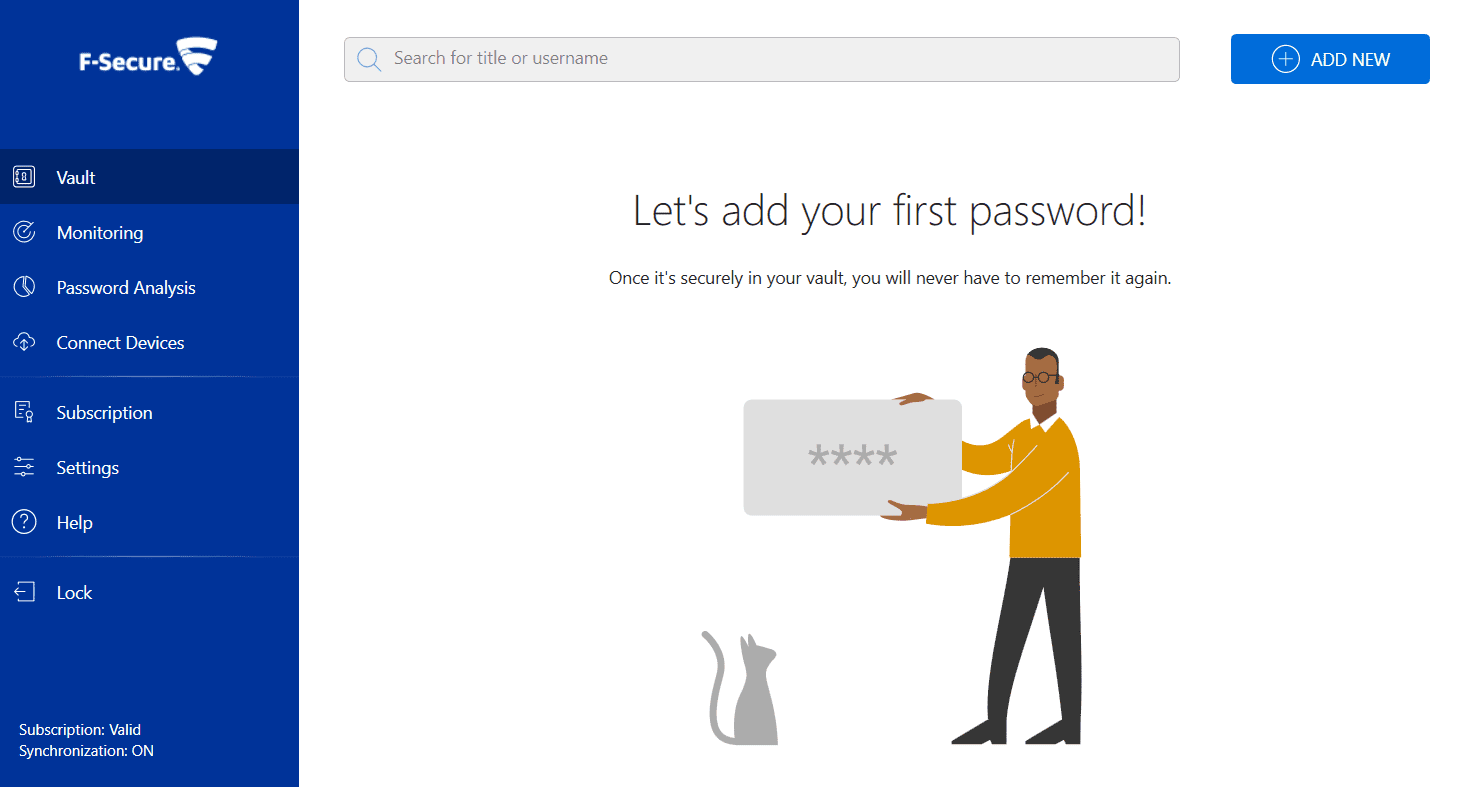
The F-Secure app has just four main sections in the left toolbar to help you manage your account: Vault, Monitoring, Password Analysis, and Connect Devices.
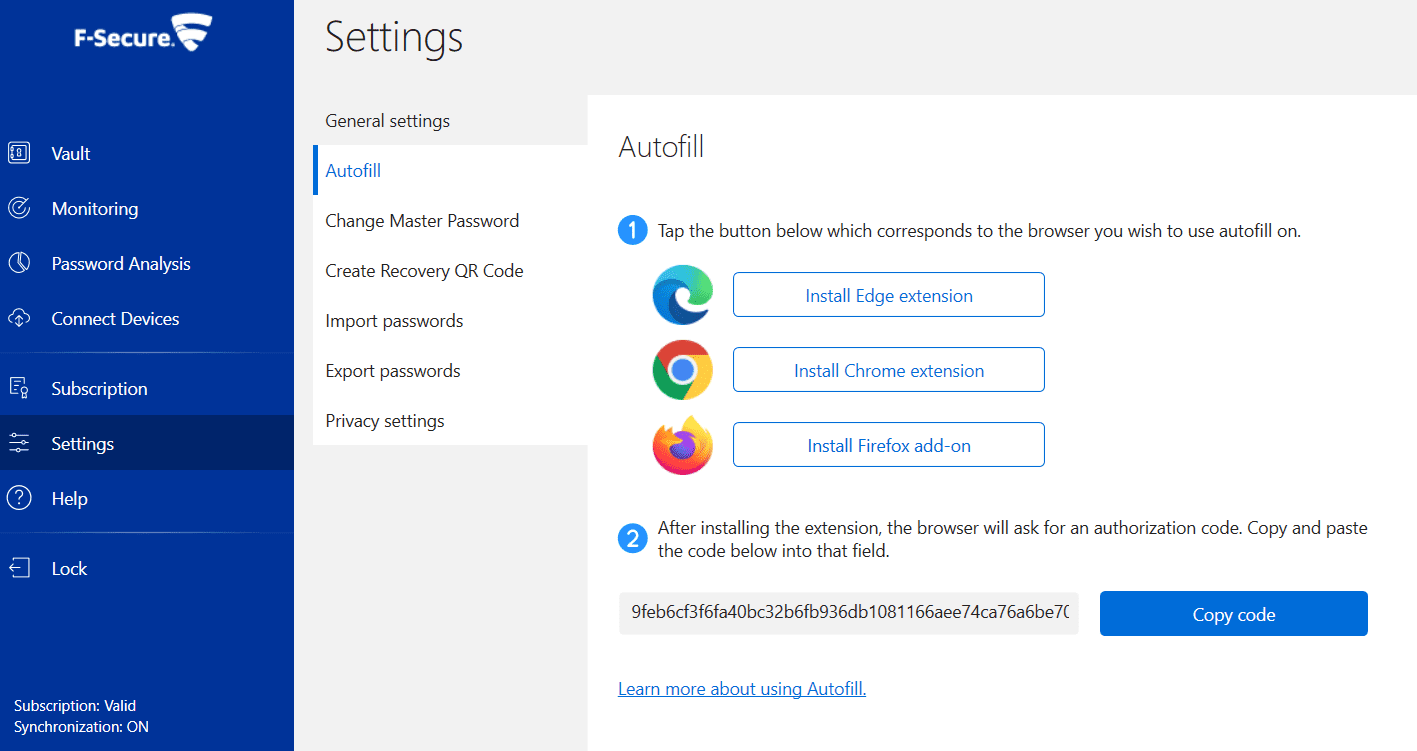
While many password managers have opted to move their products to a standalone browser extension, F-Secure requires you to install both a desktop application and a browser extension to enjoy full functionality.
Thankfully, this process is guided and incredibly easy with automatic browser detection and simple-to-follow prompts to help you link the two. Once you have them linked, you’ll forget that the extension is even there, with all of your management occurring within the desktop application or phone app.
The only bump I hit in setting things up was with 2FA, which I’ll cover in more detail in the 2FA section below. Everything else was as smooth and easy to use as the best password managers on the market.
F-Secure Form Filling
Overall: (3.5)
Automatic login and credit card info filling works great, but form filling is conspicuously absent.
The information that it does store is easily automatically recognized and filled on websites. But I was disappointed to find that basic informational form filling (such as for addresses) was nowhere to be found.
This might not be a big deal for many since most browsers include this feature. Yet it was still unusual for this feature to be completely absent, particularly from a product offering in this price category (or even cheaper options).
F-Secure Security
Overall: (5)
Active account monitoring and strong password generation are just a few notable (and excellent) security options.
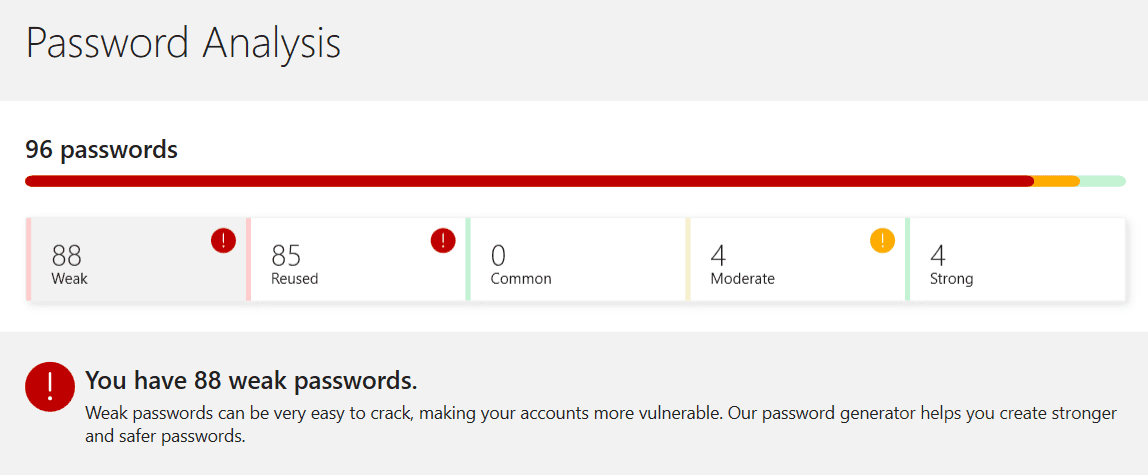
F-Secure is a little pricier than a lot of other password managers on the market. But it does its best to justify that price tag with premium features including active monitoring of email accounts, automatic password analysis for every saved password, and easy-to-follow suggestions for making your accounts more secure.
It also uses a different encryption standard than most password managers, PBKDF2, and AES 256-bit encryption. This slows down the encryption process — while fast is usually better in the computer world, the encryption process usually benefits from a “low and slow” approach. The longer it takes to encrypt, the longer it takes to crack that encryption.
F-Secure Two-Factor Authentication
Overall: (3)
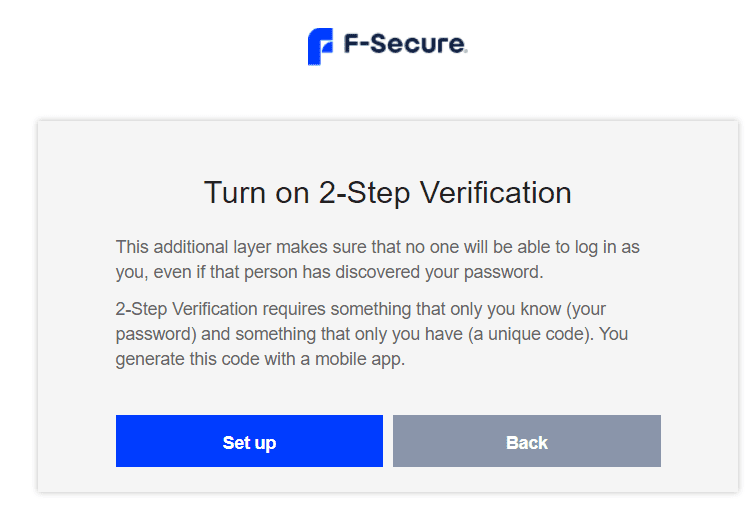
2FA is available, though it’s limited in options and doesn’t allow you to pick and choose which accounts get this extra level of security — it’s all or nothing.
I found F-Secure to be pretty good at guiding me through installation, account set-up, and importing passwords, though it’s less intuitive when it comes to getting 2FA turned on. The option doesn’t even appear in the dedicated application; you have to enable it via your account on the website.
While this wasn’t a huge deal, I was a little disappointed the only 2FA option available was enabling it only when logging into your F-Secure app. This gives you better security, but it’s also an extra barrier to logging into your account, which could be grating for some.
Having the option to enable it for a specific, individual account for sensitive institutions (like your bank), which you don’t access as often, would have been better. This added to a lack of 2FA verification options (an authenticator app is the only verification method) pings F-Secure’s score a bit.
Recent Improvements to F-Secure
Here are some recent improvements to F‑Secure ID Protection (Password Vault) from 2024–2025:
Step1.Updated localization and improved autofill icon placement for Firefox.
Step3.Stand‑alone ID Protection app phased out in April 2024; functions merged into the main F‑Secure app.
Compare F-Secure Alternatives
F-Secure is a strong contender for password management, but competitors including Dashlane, Keeper, RoboForm, LastPass, and NordPass could be a better fit.
See how F-Secure compares to other top-tier password managers:
Platform & Device Compatibility Windows, macOS, Linux, Android, iOS, and popular browsers, such as Google Chrome, Firefox, Edge, Brave, Opera, and Safari
F-Secure comes in at a relatively high price compared to other options on the market and doesn’t include useful features like general form filling and extensive 2FA.
Can F-Secure be trusted?
According to F-Secure’s privacy policy, your passwords and other information, such as credit and debit card details and personal notes are stored on servers hosted by F-Secure and locally on your client devices in an encrypted format. The encryption key is the end-user master password, which is never exposed outside the service on your device.
Can I use F-Secure ID Protection on my phone?
You can use F-Secure ID Protection on five to 10 mobile devices and computers.
Is F-Secure ID Protection worth paying for?
That’s up to you, but F-Secure ID Protection is a mature product from a veteran in this space. It has a strong feature set, simplified plan structure, money-back guarantee, and multiple support options make it a good value.
Where does F-Secure store my passwords?
F-Secure password vault stores passwords locally on your device.
What Is F-Secure the Company?
F‑Secure has been in the cybersecurity industry for over 30 years. It serves around 30 million people worldwide with security products designed to protect online accounts and identities. In a demerger completed on June 30, 2022, F‑Secure separated from the WithSecure group.
How I Rated F-Secure
Our rating process involves a thorough and detailed study of the various features stacked against the competition. I looked at the multiple facets and features provided by F-Secure compared to other significant industry players through direct testing to ensure an accurate rating. I’ve also applied my experience using F-Secure to provide a user’s perspective.
I signed up for a plan with F-Secure to test:
Plan value: Most password managers offer various subscription plans from free to around $20 per month. While free plans may be sufficient for some, those that need more functionality may prefer paid plans.
Platform compatibility: You likely access your online accounts from multiple devices, including desktops, laptops, tablets, phones, as well as through different web browsers. Your password manager should be compatible with various devices, OS and browsers, and sync seamlessly between them all.
UX: This is how you interface with all the features and functions of your new password manager — if it’s bad, you’ll be less likely to use the service. While this is a highly subjective category and some will disagree, it’s important to provide an overview based on my experience.
Form filling: A password manager doesn’t have to include form-filling, but it’s somewhat standard and the ease with which it performs that function can be the deciding factor in which password manager you ultimately choose.
Security: Since a password manager is first and foremost a security tool, it should come with all of the most up-to-date standard security features. This includes the highest level of available encryption (256-bit AES with PBKDF2-HMAC-SHA512); 2FA, such as biometric logins or multi-factor authentication, and a password generator.
Two-factor authentication (2FA): Used all over the internet to protect your accounts, this is quickly becoming a standard security practice. 2FA is a great way to secure more sensitive accounts to ensure they’re not breached.
Bottom line: F-Secure’s security features are top-notch and are a clear standout in the field. However, if you’re looking for a comprehensive form-filling solution or extensive two-factor authentication (2FA) options, you’d be better off looking elsewhere. If those things aren’t a major hit, F-Secure is well worth a look.
Kallstrom is a Cyber Team Lead for a DOD contracting company in Huntsville, Alabama, and has also worked as a computer network defense (CND) Cyber Analyst. An author and content creator for a cybersecurity academy, Kallstrom spent nearly 15 years in the Army as a musician before entering the cybersecurity field.
He holds a bachelor’s degree in music from Thomas Edison State University and a master’s in organizational development and leadership from the University of the Incarnate Word.
Kallstrom has completed several Computing Technology Industry Association (CompTIA) courses, including Security+, Network+, A+ Core 1, and A+ Core 2. He earned a CompTIA Security+ Certification. Additionally, he has completed the Cyber Warrior Academy program with more than 800 hours of hands-on, intensive, and lab-driven technical training in cybersecurity methods and procedures.
Passionate about all things cyber, Kallstrom was a speaker on a panel at the 2022 InfoSec World conference, giving a talk entitled “Hacking into a Cyber Career – True Stories.” Kallstrom is also a mentor to entry-level cybersecurity candidates seeking to break into the field. When he’s not working, he still enjoys playing guitar and fishing (not phishing).